Learning technology online has never been more accessible. With thousands of courses, tutorials, coding platforms, and free learning resources available, beginners can develop valuable technical skills from almost anywhere.
However, there is one problem many online learners face: knowing what to build after completing a lesson or course.
Watching tutorials can help you understand concepts, but building real-world projects is what turns that knowledge into practical experience. Projects allow you to experiment, make mistakes, solve problems, and create something you can eventually showcase on your resume, GitHub profile or portfolio.
The good news is that you don’t need to work for a technology company to build meaningful tech projects. You can create useful applications while learning Python, web development, data analytics, artificial intelligence and cloud computing.
Here are 10 real-world tech projects you can build while learning online.
1. Personal Expense Tracker with Python
A personal expense tracker is an excellent beginner Python project because it teaches programming concepts while solving a problem many people actually have.
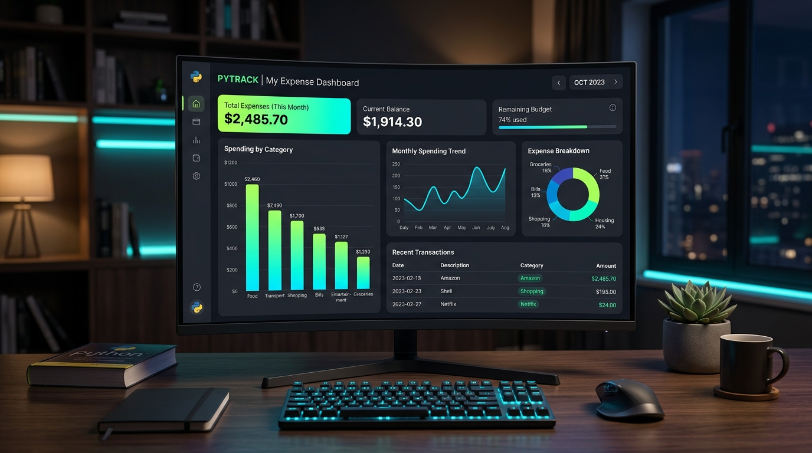
The application could allow users to enter expenses such as food, transportation, rent, entertainment, and shopping. You could then calculate total spending and display expenses by category.
Features to include:
- Add, edit, and delete expenses
- Categorize transactions
- Calculate monthly spending
- Search transactions by date or category
- Export data to CSV
- Display spending summaries
Start with a simple command-line application using Python. As your skills improve, you could turn it into a graphical application using Tkinter or a web application using Flask or Django.
Skills you can learn: Python, functions, file handling, databases, data structures, and basic application design.
2. Automated File Organizer
If you’re looking for another practical Python project, build an automated file organizer.
The program can scan a folder and automatically move files into appropriate directories. For example, images can go into an “Images” folder, PDFs into “Documents,” and videos into “Videos.”
You can use Python’s os and pathlib libraries to work with files and directories.
Possible improvements:
- Detect file extensions automatically
- Create folders when they don’t exist
- Rename duplicate files
- Generate an organization report
- Add a simple graphical interface
- Schedule the program to run automatically
This project is particularly useful because it introduces you to automation a major reason developers use Python.
3. Responsive Personal Portfolio Website
A personal portfolio website is one of the best web development projects for beginners.
Instead of simply telling employers what you know, you can demonstrate your skills through a website you built yourself.
Your portfolio could include:
- About Me section
- Skills
- Projects
- Education
- Certifications
- Contact form
- Links to GitHub and LinkedIn
Start with HTML and CSS. Then add JavaScript to create interactive elements such as menus, animations, form validation, and project filters.
Once you’re comfortable with frontend development, you can add a backend and database.
Skills you can learn: HTML, CSS, JavaScript, responsive design, Git, GitHub, and web deployment.
4. Local Business Directory
A local business directory is a great project for learners who want to practice building something closer to a real commercial website.
Imagine creating a website where users can search for restaurants, shops, repair services, tutors, or other businesses.
Each listing could include:
- Business name
- Description
- Category
- Location
- Contact information
- Opening hours
- Website
- Customer rating
You can initially store the information in a JSON file or SQLite database. Later, build a proper backend with Django, Flask, Node.js, or another framework.
You could also add search, filtering, authentication, and an administrator dashboard.
This project teaches you how different parts of a web application work together.
5. Sales Analytics Dashboard
If you’re learning data analytics, building a dashboard is one of the best ways to demonstrate your skills.
Create a fictional or publicly available sales dataset containing information such as products, customers, locations, dates, and revenue.
Then build a dashboard showing:
- Total sales
- Monthly revenue
- Best-selling products
- Sales by location
- Customer trends
- Profit margins
- Year-over-year performance
You can use tools such as Excel, Power BI, Tableau, or Python libraries such as Pandas and Plotly.
The important part isn’t simply creating attractive charts. Your dashboard should help someone answer business questions.
For example: Which products generate the most revenue, and which months have the strongest sales?
6. Student Performance Dashboard
Another useful data analytics project is a student performance dashboard.
Use a dataset containing student grades, attendance, subjects, and other relevant academic information. You can analyze the data to identify trends and relationships.
Your dashboard might answer questions such as:
- What is the average grade?
- Which subjects have the highest failure rate?
- Does attendance correlate with performance?
- How do results change between semesters?
- Which students or groups need additional support?
This project gives you experience with data cleaning, analysis, visualization, and communicating insights.
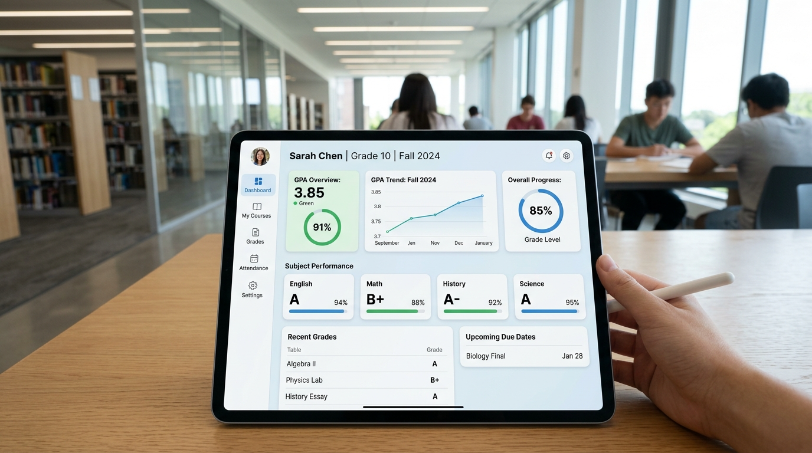
It can also make an excellent portfolio project because it demonstrates that you understand more than just creating charts you understand how to extract useful information from data.
7. AI-Powered FAQ Chatbot
Artificial intelligence is one of the most exciting areas for technology learners, and you don’t need to build a sophisticated model from scratch to create an interesting AI project.
Try building an AI-powered FAQ chatbot for a fictional business, school, website, or online course platform.
The chatbot could answer questions about:
- Products
- Services
- Pricing
- Course information
- Business hours
- Frequently asked questions
You can begin with a simple rule-based chatbot and then experiment with machine learning or modern AI APIs.
As you improve the project, consider adding conversation history, document-based question answering, and a web interface.
This project can help you understand how AI applications are integrated into real-world software.
8. Image Classification Application
For learners interested in machine learning, an image classification application can be a rewarding project.
The goal is to train a model to identify different categories of images.
For example, you could build a system that distinguishes between:
- Cats and dogs
- Different types of plants
- Fruits and vegetables
- Different types of recyclable waste
- Handwritten digits
You can use Python and machine learning libraries such as TensorFlow, PyTorch, or scikit-learn depending on the project.
Start with a small dataset and a simple model. Once you understand the fundamentals, experiment with better datasets, preprocessing techniques, and pretrained models.
Document your methodology and results so potential employers can see how you approached the problem.
9. Deploy a Web Application to the Cloud
Cloud computing becomes much easier to understand when you actually deploy something.
Take one of your existing projects a portfolio website, expense tracker, API, or web application and deploy it to a cloud platform.
Your project could include:
- A frontend application
- Backend API
- Database
- Authentication
- Cloud storage
- Domain name
- HTTPS
You can then learn concepts such as virtual machines, containers, databases, networking, environment variables and deployment pipelines.
The project doesn’t need to be complicated. The goal is to understand what happens between writing an application on your computer and making it accessible online.
10. Serverless Image Upload Application
For a more advanced cloud project, build a serverless application that allows users to upload images.
A simple architecture could include a web interface, an API, cloud storage, and serverless functions.
For example:
- A user selects an image.
- The application uploads it to cloud storage.
- A serverless function processes the file.
- Metadata is stored in a database.
- The user can view their uploaded images.
This project introduces you to event-driven architecture and cloud services without requiring you to manage a traditional server.
You can extend it with image resizing, authentication, file validation and automatic deletion of old files.
How to Choose the Right Project
You don’t need to build all 10 projects at once. Choose projects based on the skills you are currently learning.
If you’re learning Python, start with the expense tracker or file organizer.
If you’re learning web development, build the portfolio website or business directory.
If you’re learning data analytics, create a sales or student performance dashboard.
If you’re exploring AI, experiment with a chatbot or image classification application.
If you’re learning cloud computing, deploy an existing application before attempting a more advanced serverless project.
The key is to gradually increase the difficulty.
Make Every Project Portfolio Worthy
Simply completing a project isn’t enough. You should document what you built and explain the decisions you made.
For every project, consider including:
- Project description: What problem does it solve?
- Technologies: Which programming languages and tools did you use?
- Features: What can users actually do?
- Challenges: What problems did you encounter?
- Solutions: How did you solve them?
- Screenshots: What does the application look like?
- Demo: Can someone try it?
- GitHub repository: Can someone inspect the code?
A well-documented small project can be more impressive than a large project that contains little explanation.
Online learning can give you the knowledge needed to enter the technology industry, but building real-world projects is how you turn that knowledge into practical skills.
The 10 projects above give you opportunities to practice Python, web development, data analytics, AI, and cloud computing while creating work that can eventually become part of your professional portfolio.
Don’t wait until you finish an entire course before starting.
Build something small today, improve it as you learn, and gradually turn simple projects into increasingly sophisticated applications. Your projects don’t need to be perfect they need to demonstrate curiosity, problem-solving, consistency and the ability to turn ideas into working technology.
That is one of the most valuable lessons you can gain from learning online.