Learning Excel doesn’t have to cost you a dime. Trying to understand formulas or a job seeker looking to add “Pivot Tables” to your resume, the internet is flooded with free resources. However, not all free platforms are created equal.
Some offer structured video courses, others provide text-based references, and a few give you access to downloadable practice files. To save you hours of searching, we have tested and compared the top five free platforms to learn Excel. Below, you will find a detailed breakdown of each resource, a comparison table, and a guide on which one fits your learning style.
Quick Comparison
If you are in a hurry, here is how the top platforms stack up against each other regarding format, difficulty, and certification.
| Platform | Best For | Format | Free Certification? | VBA/Macros Coverage |
|---|---|---|---|---|
| W3Schools | Absolute Beginners | Text & Interactive Examples | Yes (Paid exam optional) | No |
| GoSkills | Structured Learners | Video & Quizzes | Yes (Free courses) | Yes (Paid courses) |
| TrumpExcel | Practical Application | Video & Blogs | No | Yes |
| Excel-Easy | Visual Learners | Text & Screenshots | No | Yes (Extensive) |
| Telegram Channels | Quick Tips & Data Analysis | Social Media / Posts | No | Occasional |
1. W3Schools Excel: The “Code-Like” Approach
Best for: Absolute beginners who want a quick, no-nonsense reference.
W3Schools is famous for its web development tutorials, and its Excel section follows the same philosophy: simple, bite-sized, and text-heavy . Unlike video courses that can drag on, W3Schools breaks down Excel into logical chapters, from “Excel Overview” to “Excel Syntax.”
Why it stands out:
The platform is incredibly straightforward. If you just need to know how to write a specific formula like =VLOOKUP or =SUMIF, you can find it here in seconds . It offers “Try it Yourself” editors where you can see the formula in action. While it lacks the production value of video courses, it is arguably the fastest way to look up a specific function without sitting through a 10-minute video.
Pros:
- Free Certification: W3Schools offers an end-of-pathway certification exam (though passing the paid proctored exam is optional) .
- Bite-sized: Perfect for micro-learning sessions.
- No distractions: Just the code and the explanation.
Cons:
- Lacks in-depth video explanations.
- Not ideal for learning complex data visualization or dashboarding.
2. GoSkills Excel Courses: The Interactive Classroom
Best for: Beginners who want a structured, interactive experience with quizzes.
GoSkills offers a polished learning experience. While they have paid courses, their “Excel in an Hour” course is completely free and has enrolled over 42,000 learners . This course is designed to give you a comprehensive overview of Excel features, functions, and data tools quickly.
Why it stands out:
GoSkills excels at engagement. Instead of just watching a video, you are prompted to take short quizzes and complete hands-on exercises. This “active learning” approach helps cement the knowledge. Furthermore, upon completion of their free courses, you receive a certificate of completion, which is a nice morale booster and a small addition to your LinkedIn profile .
Pros:
- Interactive: Includes quizzes and exercises to test your knowledge .
- Certification: Free certificates are available for free courses like “Excel in an Hour.”
- Beginner Friendly: The interface is clean and easy to navigate.
Cons:
- Advanced topics (like Power Query or advanced VBA) usually require a paid subscription.
- The free library is limited compared to text-based sites.
3. TrumpExcel: The Practical Playbook
Best for: Users who want to solve real-world business problems and learn advanced tricks.
Sumit Bansal, the creator of TrumpExcel, is a recognized Microsoft MVP. His platform is a treasure trove of free tutorials, tips, and downloadable practice files . Unlike academic courses, TrumpExcel focuses heavily on application. You won’t just learn what a function does; you will learn how to use it to clean messy data or automate a repetitive task.
Why it stands out:
The content is incredibly deep. If you search for “Data Cleaning” or “Flash Fill,” TrumpExcel likely has a dedicated video and article with a sample workbook you can download . It bridges the gap between knowing the buttons and actually using them in a corporate environment.
Pros:
- Downloadable Files: You can practice alongside the instructor using the same data .
- Practical Focus: Teaches shortcuts and workflows used in actual jobs.
- Free Video Course: Offers a comprehensive “Free Online Excel Training” series .
Cons:
- The website design is functional but not as sleek as modern learning platforms.
- No formal certification or progress tracking.
4. Excel-Easy: The Visual Encyclopedia
Best for: Visual learners who need step-by-step screenshots and VBA guidance.
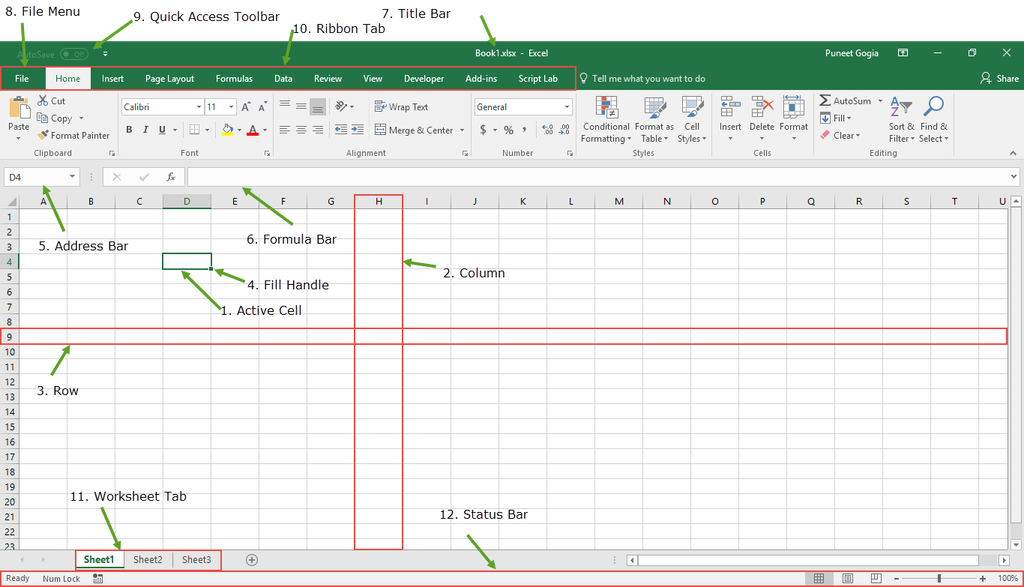
Excel-Easy is a classic resource that has stood the test of time. It is famous for its “300 Examples” section, which covers everything from basic arithmetic to advanced statistical analysis and VBA (Visual Basic for Applications) .
Why it stands out:
This platform is uniquely strong in VBA and Macros. While many free sites stop at Pivot Tables, Excel-Easy provides a dedicated 16-chapter VBA tutorial for beginners . The visual nature of the site—using arrows and highlighted cells in screenshots—makes it easy to follow along even if you aren’t watching a video.
Pros:
- VBA Focus: One of the best free resources for learning Excel automation .
- Visual Guides: Clear screenshots with highlighted cells show you exactly where to click.
- Comprehensive: Covers a massive range of functions and chart types.
Cons:
- The content is mostly static (text and images), which can feel dry.
- No interactive exercises or quizzes.
5. Data Analysis Resources Telegram Channel
Best for: Data analysts and learners who want a constant feed of tips and curated resources.
While not a traditional “course,” Telegram channels have become a surprisingly potent source for free education. The channel Data Analysis Resources curates content specifically for aspiring data analysts .
Why it stands out:
This isn’t a structured curriculum; it is a community-driven feed. You will find daily posts with Excel shortcuts, explanations of complex formulas (like INDEX-MATCH), and links to free datasets. It is excellent for “passive learning”—scrolling through your phone and picking up a new trick on the go.
Pros:
- Mobile-Friendly: Learn on the go directly from your phone.
- Community: You can often ask questions or see what other learners are struggling with.
- Free: Completely free to join and access.
Cons:
- Unstructured: There is no syllabus or guaranteed progression.
- Quality Variance: Unlike the other platforms, content quality can vary depending on the specific post.
- No Certificate: It is purely for knowledge acquisition.
Which One Should You Choose?
- If you want a certificate for your resume: Start with GoSkills (free courses) or take the W3Schools exam.
- If you need to learn Excel for a specific job task (like cleaning data): Go to TrumpExcel and download their practice files.
- If you need to learn VBA/Macros: Use Excel-Easy; their visual guides are unmatched for coding beginners.
- If you just want to look up a formula quickly: Use W3Schools.
- If you want daily Tips: Join the Telegram Channel.
Pro Tip: Don’t try to do all of them at once. Pick one primary platform (like GoSkills for structure) and use the others (like W3Schools or Telegram) as reference tools when you get stuck. Consistency is the only way to master Excel.